

Everything MoneyFlux does, and what it deliberately doesn’t
A ledger that starts from your bank statement and keeps going: spending, commitments, capital, savings goals and trades, in eight currencies, in your own private iCloud.
Bank statement import: the data your bank already gives you
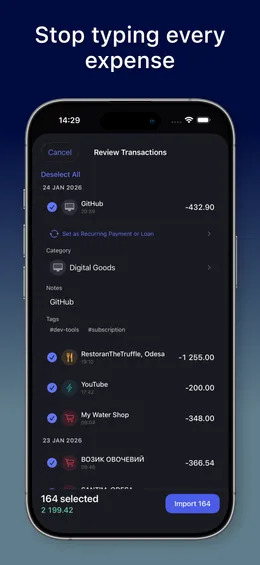
Download a statement file from your bank and open it in MoneyFlux. The app works out which bank it came from by reading the file, so there is no format picker and no question to answer.
Every row lands on a review screen first. Recategorize it, add a note or tag, or skip it. Rows already in your ledger are skipped automatically, and a statement that covers several cards lets you pick the card. The file is read on your phone and never uploaded.
How to export a statement from your bank
- PrivatBank and Monobank CSV
- Oschadbank, Raiffeisen Bank, A-Bank and Scotiabank PDF
- OFX, QFX and QBO from any bank, plus Saldo CSV export
- Categories suggested from merchant codes, duplicates skipped
- First import free; unlimited imports with Premium
Apple Pay purchases, logged as you pay
An app can’t read your Wallet, but a Shortcuts automation can hand MoneyFlux each in-store Apple Pay payment. Add the Log contactless purchase action to a Wallet automation and the purchase is saved to the account you chose, tagged #applepay.
It works for contactless payments in shops, not for online or in-app purchases, so a monthly statement import catches the rest.
- One automation per card, routed to the account you name
- Optional category per automation, or pick it after the purchase
- Free, on iPhone
Eight currencies, never mixed
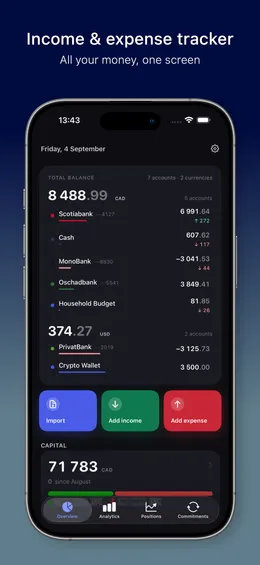
Keep UAH, USD, EUR, CAD, GBP, CHF, PLN and RON accounts side by side. Balances and totals are grouped per currency and analytics look at one currency at a time.
MoneyFlux never converts with an exchange rate it made up, so you never see one big total that means nothing. Transfers between your own accounts need matching currencies for the same reason.
Why a multi-currency ledger shouldn’t convert
- Bank cards, cash, crypto wallets and other accounts
- A totals row per currency
- No invented exchange rates, by design
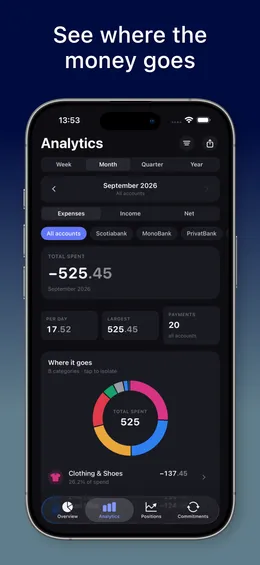
Analytics that show where the money went Premium
See spending, income and net by category, merchant and day for any week, month, quarter or year, with your per-day average and largest payment.
Premium adds period-over-period comparison, filters by account, category and tag, category drill-down and a spending heatmap, plus CSV, PDF and PNG exports from the Analytics screen.
Find out where your money goes each month
- Category donut, cashflow and trends
- One period at a time free; comparison and filters with Premium
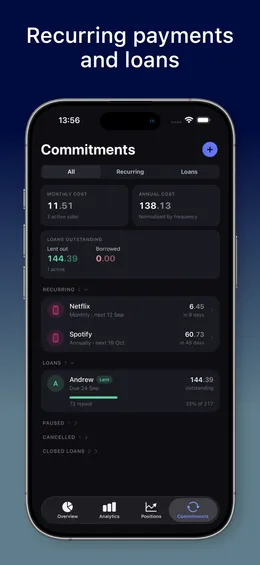
Commitments: subscriptions and loans in one list Premium
Everything you are on the hook for, in one place: recurring payments and money you lent or borrowed, with a monthly and an annual total that normalizes weekly, monthly and yearly charges.
A banner appears three days before something charges and when someone is late paying you back. Record repayments with 25%, 50% or Full shortcuts, or forgive a loan and keep its history.
How to track subscriptions and recurring payments
- Due-soon and overdue banners, local reminders
- Imported statement rows link to the matching payment
- Lent and borrowed tracked separately
Capital: net worth that points somewhere Premium
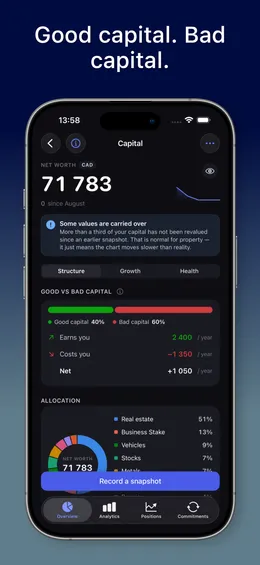
Sort what you own by direction of cash flow, not by price. Good capital pays you; bad capital costs you, measured as annual income minus annual holding cost. The same apartment lands on opposite sides depending on whether it is rented out or lived in.
Your asset list is free. Premium adds quarterly snapshots, growth over time, health metrics and risk targets.
Good assets vs bad assets, explained
- Good vs bad capital split
- Snapshots, growth and health with Premium
- Amount privacy toggle
Savings goals in real money
Create goals for an emergency fund, a laptop or a trip, in any of your currencies and with a deadline if you want one. Money you put in or take out moves the card balance with it.
Set a savings target as a share of income and MoneyFlux turns this month’s real income into an amount to put away, offers to split your salary across goals, and spots transfers to savings in imported statements.
- Monthly amount and expected finish date at your current pace
- Optional reminder on the 25th
- Free
Positions: a trading journal that keeps score Premium
Log crypto and trading positions with their fills, and keep the calls of the traders or channels you follow next to what your own money did.
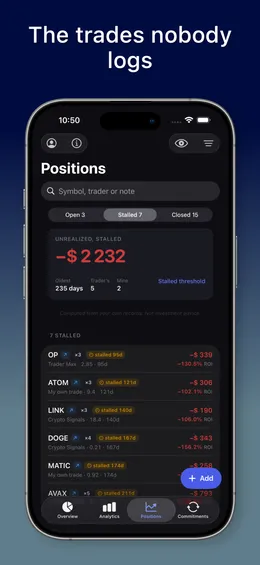
The trader scorecard puts three records side by side: what was claimed, what the trader’s own quoted prices imply, and what you made. It counts the calls that never closed, which most channels don’t.
How to check a trading channel’s real track record
- Stalled positions, strategy breakdown, liquidations
- CSV import; no live price feed, you enter the prices
Ask AI about your own numbers Premium
On Analytics, Positions and Commitments you can ask a question in plain words, like which category grew the most this month. The answer is written from totals your device already calculated.
It is off until you switch it on. It then sends a summary of that screen’s totals and your question to our relay and on to OpenAI, never an individual transaction, account number or the name of someone you lent to. It observes; it never gives financial advice.
- Opt-in, off by default
- Up to 50 questions per device per month
- iPhone and iPad
Private by construction, synced through your iCloud
There is no account to create and nothing to sign in to. Your records live on your device and sync to your own private iCloud through Apple’s CloudKit, where only you can read them.
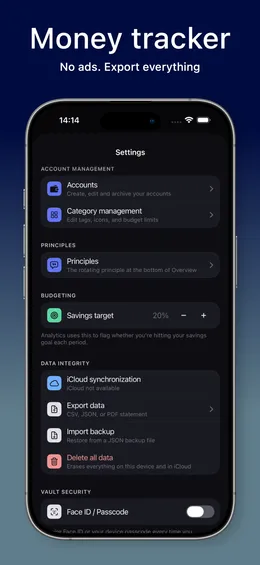
Lock the app with Face ID or a passcode, export everything as CSV, PDF or a JSON backup, restore that backup any time for free, and delete every record, iCloud copy included, in one tap.
- No ads, no trackers, no sign-up
- Exports stay yours for good once you have subscribed
- Backup restore always free
63 principles on money
A short idea sits at the bottom of your overview: from Benjamin Franklin, John D. Rockefeller or written for the app, with a line explaining what it means. Genuine quotations carry their source; paraphrases are never dressed up as quotes.
About a third link straight to the screen where you would act on them, like your loans list or spending by category.
- Available in English, Ukrainian and Russian
- Shareable as a square card