

Net worth
Good Assets vs Bad Assets: Which Way Does Your Net Worth Point?
On paper you own a lot. At the end of the month you're still short. The missing piece is usually not how much your things are worth, but which way their money flows.
Accounts & currencies
Hryvnias at home, dollars from a client, Canadian dollars for rent. Most apps squeeze it all into one number with a rate they picked. Here is a calmer way to track expenses in multiple currencies.
If you earn in one currency and spend in another, a normal budget app quietly lies to you. You need a multi-currency expense tracker that records each payment in the currency it actually happened in, and then does something most apps refuse to do: leaves it there.
This post is for people whose money lives in more than one currency. A Ukrainian in Toronto with a hryvnia card back home and a Canadian chequing account. A freelancer in Lviv paid in dollars by a US client, spending hryvnias. Someone in Kraków with a zloty salary and euro savings. If that is you, here is how to track expenses in multiple currencies without ending up with a number that means nothing.
You probably do if any of these are true:
The common thread: your money doesn’t share a unit. Pretending it does is where the trouble starts.
Many apps pick a “home currency” and convert everything into it, using a rate they download or one you type in. You get a tidy single figure at the top of the screen. It looks helpful. It isn’t, for three reasons.
There is no single exchange rate. There is a central bank’s official rate, your bank’s buy rate, its sell rate, the card network’s rate on the day the payment settled, and whatever the exchange office down the street offers. When you actually changed 500 dollars, you got one specific rate, with fees. An app that converts your balances uses some other rate. The difference is small on one payment and adds up over a year.
Convert a dollar balance into hryvnias every day and your “total” changes every day, even if you didn’t spend a cent. A weaker hryvnia makes you look richer. A stronger one makes you look like you overspent. When you are trying to answer “where did my money go this month”, that noise hides the real answer.
A month of rent and groceries in CAD, averaged with a month of family transfers in UAH, gives you a chart of nothing in particular. You can’t see that your Canadian grocery bill crept up, because it is mixed with hryvnia spending converted at a rate that also moved.
Accountants handle this with formal rules: record each transaction in its original currency, convert at a specific dated rate when a report requires it, and book the difference as a currency gain or loss. That is the right tool for a business filing taxes. For a person trying to understand their own month, it is overkill, and an app that does a casual version of it gives you the downside without the rigour.
MoneyFlux takes the opposite approach on purpose: it has no exchange rates at all. Each currency is kept and totalled on its own.
You can hold accounts in eight currencies:
| Code | Currency | Typical use |
|---|---|---|
| UAH | Ukrainian hryvnia | Cards at PrivatBank, Monobank and other Ukrainian banks, cash |
| USD | US dollar | Freelance income, savings, crypto values |
| EUR | Euro | Savings, EU accounts, travel |
| CAD | Canadian dollar | Living in Canada: chequing, credit cards |
| GBP | British pound | UK accounts |
| CHF | Swiss franc | Swiss accounts |
| PLN | Polish złoty | Living or working in Poland |
| RON | Romanian leu | Living or working in Romania |
Every account has one currency, chosen when you create it and locked afterwards, so history can’t be silently rewritten. A Monobank hryvnia card and a Monobank dollar card are two accounts. If you need help deciding how to split them up, our guide to tracking cards, cash and crypto in one place covers account setup in detail.
The Overview shows your balance grouped by currency: one subtotal for UAH, one for CAD, one for USD, each with the accounts under it. They are never summed into one figure. Tap a currency and the income, expenses and recent transactions below scope to that currency’s accounts. The Accounts list shows a totals row for each currency.
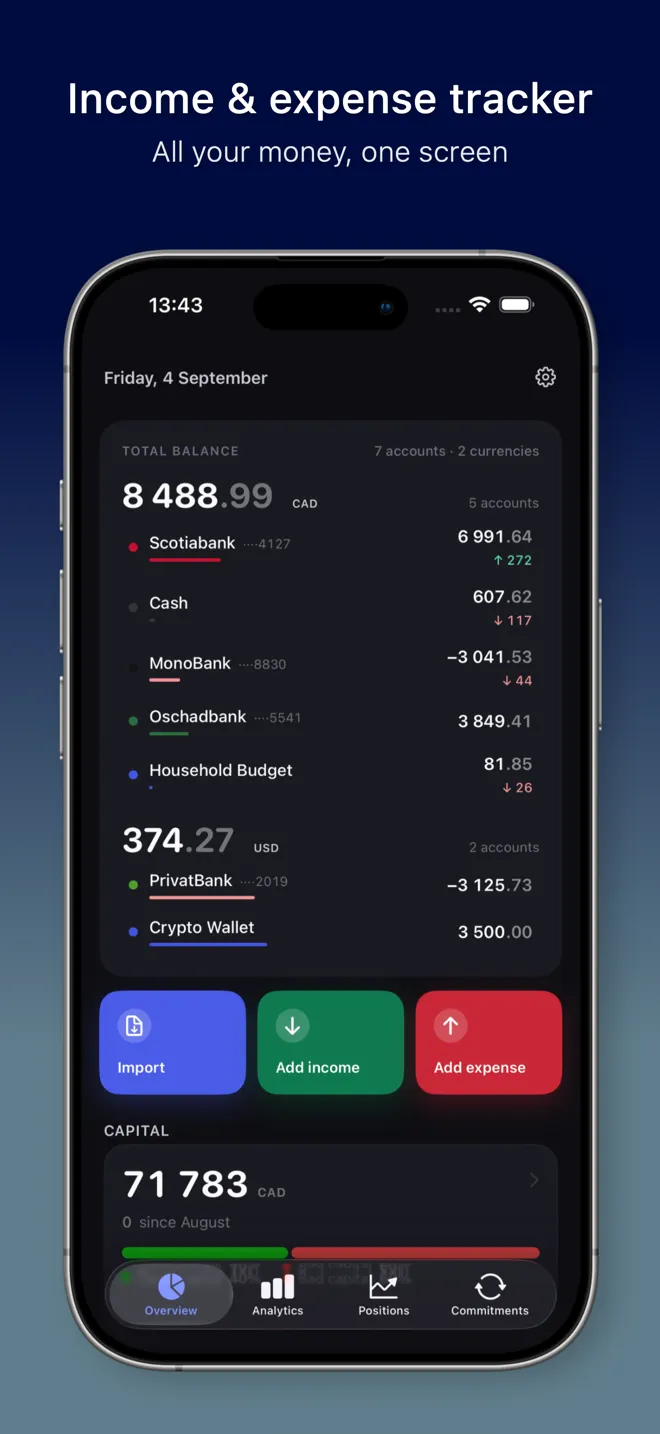
So instead of “you have 4,812 somethings”, you see “you have 41,300 in UAH, 2,150 in CAD and 900 in USD”. That is three numbers instead of one, and each of them is true.
Analytics looks at one currency at a time, so a hryvnia month and a Canadian-dollar month are never averaged together. You see your expenses, income and net for that currency: the category donut, cash flow and trends. Use the account chips to narrow it down to a single card.
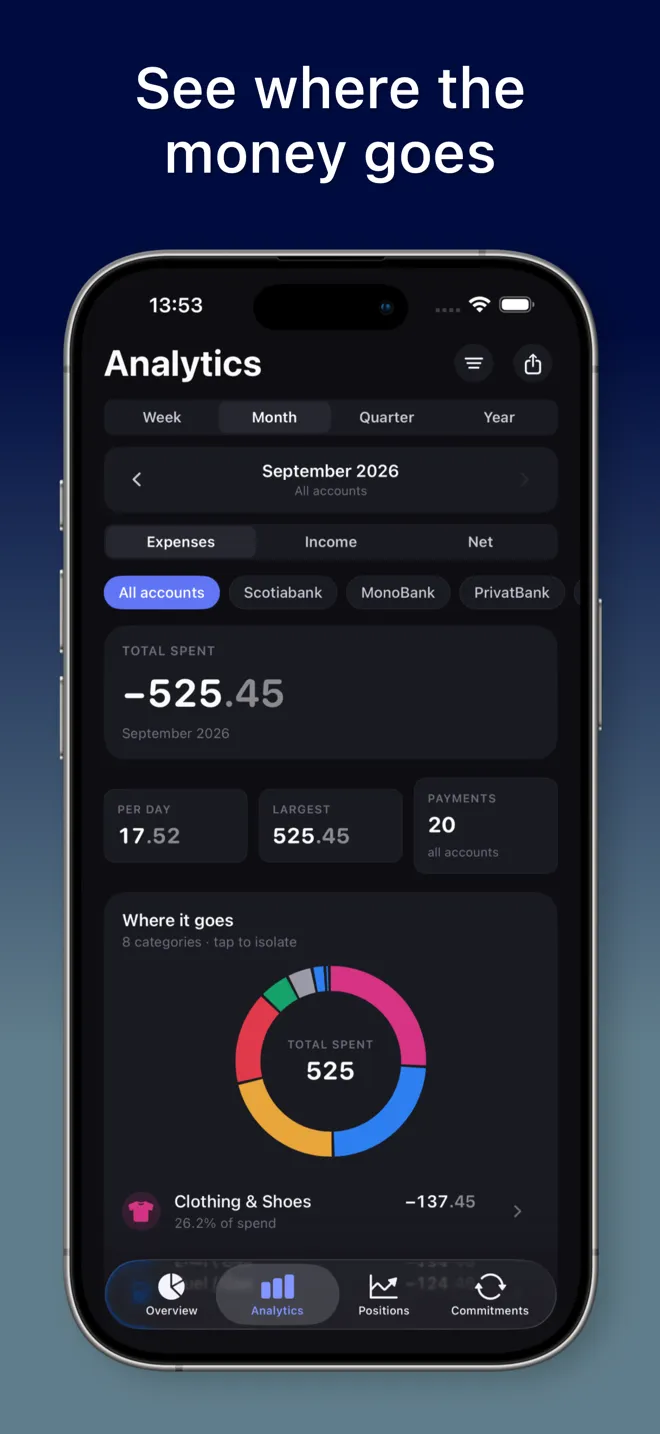
This is the view that actually answers “am I spending more on groceries in Canada than last quarter?”, because nothing else is mixed in.
Moving money between your own accounts is a transfer, not spending, and MoneyFlux records it as one. But transfers only work between accounts in the same currency. Try to transfer from a USD card to a UAH card and the app tells you plainly that the currencies have to match, rather than guessing a rate and showing you a number your bank never produced.
When you actually exchange money, you know the real numbers: you sold 500 USD and received a certain amount of hryvnias. Record exactly that:
These rows appear in Expenses for USD and in Income for UAH, so the custom category matters: it lets you recognise them at a glance and keeps exchanges from looking like shopping. Your record now holds the rate you really got, which is more useful later than any rate an app could have assumed.
If your bank gives you a statement for a foreign-currency card, import it into the account with that currency. MoneyFlux reads PrivatBank and Monobank CSV, Oschadbank, Raiffeisen Bank, A-Bank and Scotiabank PDF, OFX, QFX and QBO files from any bank, and Saldo CSV exports. The file is read on your phone, not uploaded. If one statement covers several cards, for example a hryvnia card and a dollar card, you choose the card, review it, and then import the next one from the same file. Details are on the bank statement import page.
Try it in MoneyFlux: create one account per currency you actually hold, for example a UAH card, a CAD chequing account and USD cash. The Overview will show three separate totals, and none of them will change unless you spend or earn.
Honesty about the trade-off: MoneyFlux will not give you one “total net worth” across all currencies. If you want that figure, you need to choose a rate yourself, in a spreadsheet or on paper, knowing it is an estimate for one day. We think that is the right place for it: your decision, your rate, not a number the app made up and showed you every time you opened it.
The app also has no live exchange rates and no automatic bank feed. You import the statements your banks give you, and log cash by hand.
What you get in return is a ledger where every number is a real amount of real money in the currency it actually exists in. Your records sync to your own private iCloud, where only you can read them. No ads. No trackers. No sign-up. See the multi-currency section of the features page for the full list.
This is not financial advice. It is a way of keeping records so the decisions you make are based on numbers you can trust.
Eight: Ukrainian hryvnia (UAH), US dollar (USD), euro (EUR), Canadian dollar (CAD), British pound (GBP), Swiss franc (CHF), Polish zloty (PLN) and Romanian leu (RON). Each account has one of them.
No, by design. Balances are totalled per currency and shown side by side. The app has no exchange rates, so it never produces one combined figure from a rate it invented.
Record an expense on the USD account and an income on the UAH account for the amounts your bank or exchange office actually gave you, and note the rate. A custom category such as Currency exchange keeps these rows easy to spot.
Yes, if the bank and format are supported. Import it into the account with the matching currency. If one statement file covers several cards, you pick the card and the app offers the next one after import.
Yes. Savings goals can be in any of the eight currencies, and money is put in from a card in the goal’s currency.