If you want to know how to track subscriptions properly, the hard part isn’t the tracking. It’s the finding. A streaming service sits on one card, a cloud storage plan on another, an app trial quietly turned into an annual plan, and a gym membership comes out of the account you rarely open. Each charge is small enough to ignore and regular enough to add up.
This guide walks through where subscriptions actually hide, how to turn them into one honest monthly number, and how to get warned early enough to cancel. The last part shows how MoneyFlux does it, including what it does not do.
Where do forgotten subscriptions hide?
Subscriptions are billed in two different ways, and you need to check both.
- Through Apple. Anything you started inside an iPhone app with an App Store purchase is billed by Apple. On your statement it usually appears as an Apple charge rather than under the app’s own name, which is why these are easy to lose.
- Directly with the company. Netflix through their website, a newspaper, a VPN, a phone plan, your gym. These are billed to whichever card you typed in at the time and appear on that card’s statement under the merchant’s name (sometimes a shortened or odd one).
A complete list needs both sources. Neither one alone is enough.
How to find subscriptions on your iPhone
Apple keeps every subscription billed through your Apple Account in one place. According to Apple’s support page on cancelling subscriptions, the steps on iPhone are:
- Open Settings and tap your name at the top (your Apple Account).
- Tap Subscriptions.
- Tap a subscription to see its price, renewal date and plan.
- To stop it, tap Cancel Subscription. You may need to scroll down to see it.
If there’s no cancel button, or you see an expiration date in red, the subscription is already cancelled and will run until the end of the period you paid for. Apple also notes that a free trial should be cancelled at least 24 hours before it ends if you don’t want it to renew. On a Mac you’ll find the same list in the App Store under your account, and on the web at account.apple.com.
The list also shows inactive subscriptions. Scroll through them: an app you cancelled once may have been resubscribed to on another device, and the history helps you remember what you’ve tried.
Two things the Apple list won’t show you:
- Subscriptions you pay directly to a company with your card.
- Subscriptions on a different Apple Account, such as one a family member set up on a shared iPad.
How to find recurring payments in your bank statements
For everything else, go to the statements. One month is not enough. Pull the last 12 months for every card and account you have, because annual renewals only show up once a year.
Look for:
- The same merchant twice or more, roughly the same amount, roughly the same day of the month.
- Annual charges, often larger and easy to mistake for a one-off purchase.
- Small charges you don’t recognise. Search the merchant name; billing descriptors are often a parent company or a payment processor.
- Price creep. A subscription that was 9.99 last spring and 11.99 now.
- Foreign-currency charges on a card you only use for travel or online services.
If you read the statements in your bank’s app, this is slow: scrolling, tapping, squinting. It’s faster to export a statement file once and look at it in one place. Our guide on importing a bank statement instead of typing every expense shows how to get the file out of the bank.
How much do your subscriptions really cost per month?
Once you have the list, the next mistake is adding the numbers up wrong. A yearly plan at 59.99 and a monthly one at 6.99 aren’t comparable as written. The fix is to normalise everything to one period.
| Subscription |
Billed |
Amount |
Monthly equivalent |
| Video streaming |
Monthly |
15.49 |
15.49 |
| Music |
Monthly |
10.99 |
10.99 |
| Cloud storage |
Annually |
29.99 |
2.50 |
| VPN |
Every 2 years |
95.76 |
3.99 |
| Gym |
Every 4 weeks |
40.00 |
43.33 |
The amounts above are made-up examples to show the arithmetic, not real prices. Two things fall out of it:
- Yearly plans look cheap per month and expensive on the day. Knowing the monthly equivalent helps you compare; knowing the renewal date protects your account balance.
- “Every 4 weeks” is not “monthly”. It’s 13 charges a year, not 12. The monthly equivalent is the amount × 13 ÷ 12.
Keep totals per currency. If you pay some subscriptions in USD and others in CAD or UAH, adding them into one number means picking an exchange rate, and that number will be wrong next week. Two honest totals are better than one invented one. (More on why in our post on tracking expenses in several currencies.)
Should you keep it or cancel it?
With the full list and the real cost in front of you, go line by line. A few questions that work:
- Did I use this in the last month?
- Would I sign up again today, at today’s price?
- Am I paying for the same thing twice (two music services, two cloud storage plans, a bundle that already includes one of them)?
- Is there a cheaper tier I’d be happy with?
- Is this an annual plan I’d rather move to monthly, or the other way round?
Nothing here is financial advice. It’s housekeeping. Some subscriptions earn their price and should stay. The point is to choose, rather than to keep paying by default.
Cancel at the source
However you track subscriptions, the cancel button lives with whoever bills you: in Settings → your name → Subscriptions for Apple-billed ones, or in the account settings on the company’s website for direct ones. Deleting an app does not cancel its subscription. Neither does removing a card from your wallet; the merchant will usually try again and may keep the account open with a balance owed.
How to keep track of subscriptions from now on
The audit is a one-off. Staying on top of it needs three habits, and a subscription tracker app only helps if it does them for you.
- Log every new subscription or trial the day you start it, with the date it renews or converts.
- Get a reminder a few days before each charge, early enough to cancel. A reminder on the day of the charge is just a receipt.
- Match each month’s real charges to the list, so price increases and new charges stand out.
A spreadsheet can do the first. The second and third are where spreadsheets usually die, because nobody updates them.
How MoneyFlux tracks subscriptions and recurring payments
MoneyFlux keeps subscriptions in the Commitments tab, alongside money you’ve lent or borrowed. Commitments is part of MoneyFlux Premium ($4.99/month or $29.99/year in the US, with a 7-day free trial on the annual plan; local prices differ).
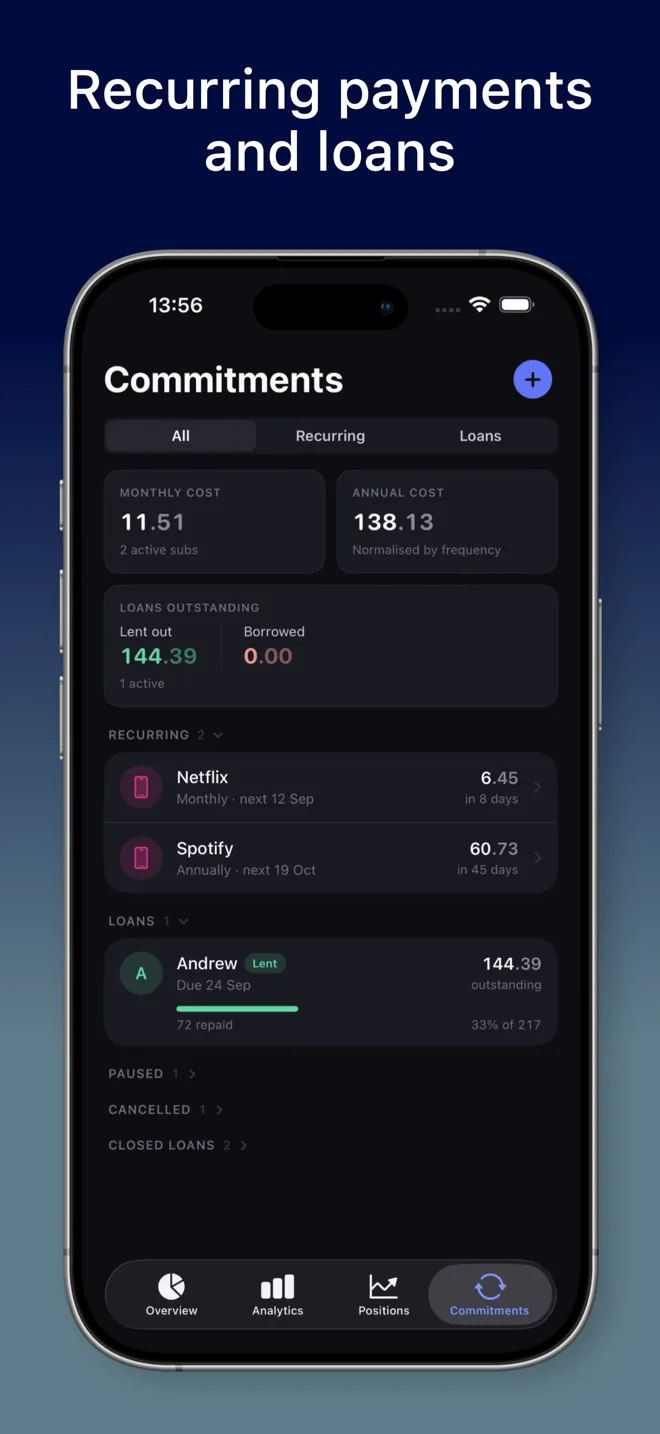
Add a recurring payment once
You add a recurring payment with the merchant, the amount and currency, the category, the account it’s paid from, and how often it charges: monthly, annually, or a custom interval such as every 4 weeks or every 2 years. While you fill it in, the form shows what it counts as per month, for example “Counts as €12.99 per month in your summary.”
You don’t have to start from a blank form. If a charge is already in your transactions, you can turn it into a recurring payment from the transaction itself.
See one monthly number and one annual number
The top of Commitments shows Monthly cost, with the number of active subscriptions, and Annual cost, normalised by frequency, so the yearly cloud plan and the monthly streaming plan land in the same total. Totals are grouped per currency; MoneyFlux doesn’t convert between currencies.
Each payment also has its own page with the next charge date, its monthly equivalent, and every charge that has linked to it, with a chart of what you’ve paid all-time. Seeing two years of one subscription added up is often what settles the keep-or-cancel question.
A nudge three days before it charges
When a payment is due within three days, a banner appears at the top of Commitments, along the lines of “Netflix charges in 2 days — €12.99 leaves Mono Black on 14 March.” You can also turn on a reminder for each payment and choose how many days before the charge it arrives, from 0 to 30. For a trial you plan to cancel, set it a few days out so you have time to act. Reminders are local notifications scheduled on your iPhone.
Imported statements link to the payment automatically
This is the part that keeps the list honest without retyping anything. When you import a bank statement, rows whose description contains the merchant name are linked to that recurring payment and tagged as recurring. The next Netflix charge in your statement files itself under Netflix. During the import review you can also link a row to an existing recurring payment by hand, or start tracking a new one.
Statement import works with files you export yourself: PrivatBank and Monobank CSV, several Ukrainian banks’ PDFs, Scotiabank PDF, and OFX/QFX/QBO files from most banks. The file is read on your phone and is not uploaded. Your first import is free; after that, import is part of Premium. There is no automatic bank connection.
Pause, cancel, keep the history
When you cancel a subscription with the merchant, mark it Cancelled in MoneyFlux. It drops out of your monthly total but stays in a collapsed Cancelled group, so the history of what you paid isn’t lost. Pause does the same for something on hold, and cancels its pending reminder. Neither stops the actual charge; only the merchant or Apple can do that.
Try it in MoneyFlux: go to Commitments, tap +, choose Recurring payment, and add the three subscriptions you’re least sure about. Set the reminder to 3 days. Then import last month’s statement and check that each charge linked itself.
What a subscription tracker can’t do
Being honest about limits saves you from relying on something that won’t help:
- It can’t find subscriptions you never record or import. MoneyFlux doesn’t scan your bank accounts. The Apple list and a 12-month statement review are still the way to find what’s out there.
- It can’t cancel anything. That stays between you and the merchant.
- Auto-linking depends on the statement description. If a bank shows a merchant under an unusual name, edit the merchant name on the recurring payment to match, or link the row manually during import.
Subscriptions are only one part of what leaves your account every month. Once they’re under control, the next step is the rest of the picture: where your money goes every month. And if someone owes you money on a schedule, the same Commitments tab handles money you lent to friends. The full list of what the tab does is on the Commitments feature page.