Most people who lend money to friends don’t lose it because the friend refuses to pay. They lose it because nobody wrote anything down. Six months later you remember “about 300,” your friend remembers “I paid some of it back,” and you’d both rather drop it than argue. Knowing how to keep track of money lent to friends is mostly about making that conversation unnecessary.
This guide covers what to record when you lend, how to ask for the money back without damaging the friendship, how to handle partial repayments, and what to do when you decide to let it go. At the end, we show how MoneyFlux handles personal loans.
None of this is legal or financial advice. For large amounts, or if you think you may need to enforce repayment, a written agreement and a lawyer’s view are worth more than any app.
What should you write down when you lend money?
The record you make on the day matters more than anything you do later. Four details are enough:
- Who. Their name, the way you’d search for it later.
- How much, and in what currency. “200 USD,” not “about two hundred.”
- When, and how. The date and whether it was cash or a transfer. A bank transfer already leaves a trail; cash doesn’t.
- When you expect it back. A specific date, or “no rush,” agreed out loud.
Add a short note on what it was for (“flights to Lviv,” “deposit on the apartment”). It sounds trivial, but it’s the detail that jogs someone’s memory months later.
Agree on the terms out loud
The easiest reminder is the one you set up at the start. When you hand over the money, say the amount and the expected date back in one sentence: “Here’s 500. End of next month work for you?” If they agree, the later reminder isn’t a surprise; it’s a follow-up on something you both said.
For larger amounts, put it in a message rather than relying on a conversation. A text that says “Sending you 1,500 now, you’ll return it by 1 December” is a record both of you can see.
Track what you borrowed, too
The same rules apply in the other direction. If a friend covered your share of a trip or lent you money between pay cheques, write it down the same way. Paying back exactly what you owe, on time, without being asked, is how you get to ask them for the same courtesy later.
How do you ask a friend to pay back money?
This is the part people avoid. Some approaches that make it easier:
Be specific and private
Vague hints (“money’s a bit tight this month…”) put the other person in the awkward position of guessing. A direct, friendly message is kinder:
“Hey, quick one: the 200 I lent you for the concert tickets in June. Could you send it over by Friday?”
It names the amount, the reason and a date, and it’s one message, not a speech. Send it privately, not in a group chat and not in front of others.
Start gentle, then get firmer
If the first message gets no answer, give it a few days and follow up once. If that doesn’t work, a call or an in-person conversation usually lands better than a third text. Keep the tone the same each time; what changes is how specific you are about the date.
Offer a payment plan
If your friend is genuinely short, a payment plan keeps the debt alive without the pressure: “No problem, could you do 100 now and 100 at the end of the month?” Small, regular repayments are easier to agree to than one lump sum, and every one you record makes the remaining amount clearer.
Decide what the friendship is worth
Sometimes the honest answer is that the amount is small and the friendship matters more. That’s a valid choice. The point is to make it on purpose, not to drift into it because you lost track.
How to handle partial repayments
Partial repayments are where memory fails worst. Three transfers of different sizes over two months, one of them in cash, and nobody is sure what’s left.
The fix is boring: record each repayment the day it arrives, with the amount and date. Then the outstanding balance is a subtraction, not a debate:
| Date |
Event |
Amount |
Outstanding |
| 3 March |
Lent to Andriy |
5,000 |
5,000 |
| 28 March |
Repayment |
1,500 |
3,500 |
| 20 April |
Repayment |
1,500 |
2,000 |
| 2 June |
Repayment |
2,000 |
0 |
When the person asks “how much do I still owe you?”, you can answer with a number and the dates behind it. That one answer prevents most arguments about money between friends.
How MoneyFlux keeps track of money you lent and borrowed
MoneyFlux tracks personal loans in the Commitments tab, next to your subscriptions and other recurring payments. Commitments is part of MoneyFlux Premium ($4.99/month or $29.99/year in the US, with a 7-day free trial on the annual plan; local prices differ).
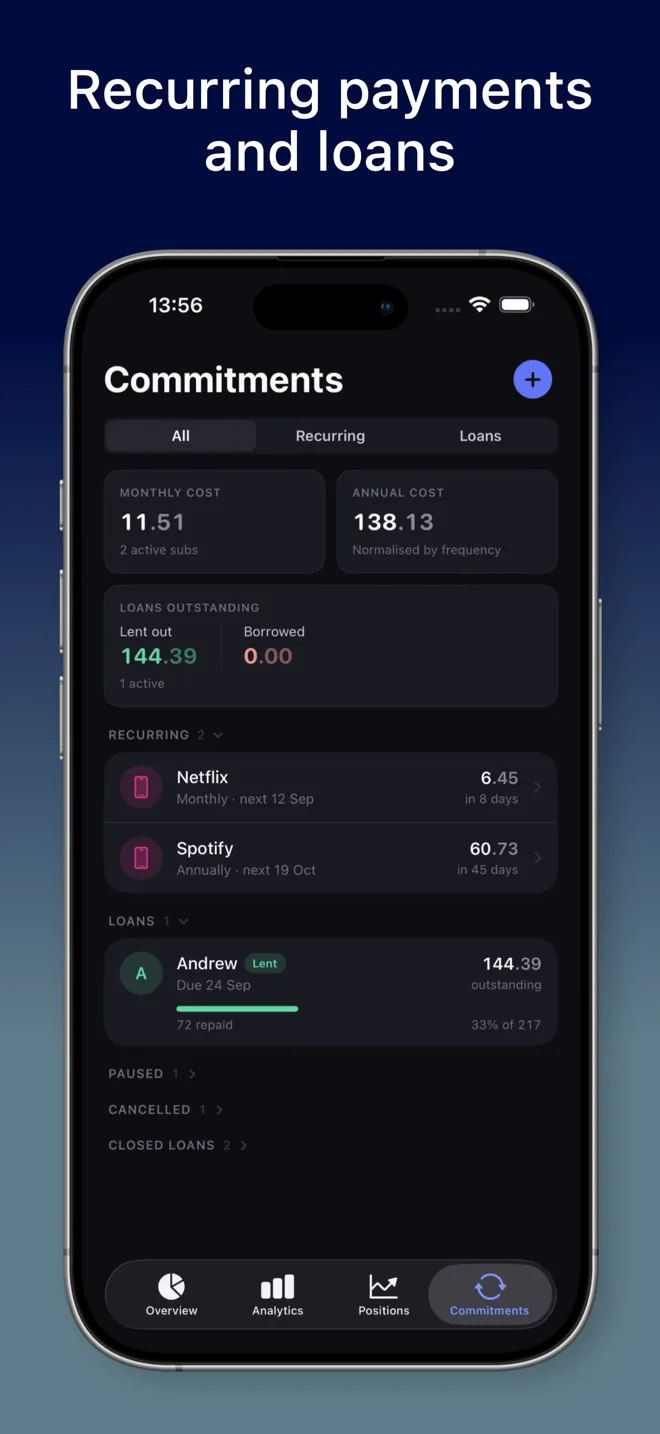
Lend money or borrow money
Tap + in Commitments and choose Lend money or Borrow money. You enter the person’s name, the amount and currency, and the account the money left or arrived in. You can choose whether MoneyFlux also creates a matching transaction on that account, so your balance reflects the loan; the form explains both choices before you save.
The due date is optional, and the form is honest about what that means: without a due date, the loan is tracked open-endedly and never shows as overdue. With one, you can turn on a reminder on the due date. The reminder is a local notification on your own iPhone. MoneyFlux doesn’t contact the other person.
If the transfer is already in your transactions (you imported a statement or logged it yourself), you can turn that transaction into a loan from its detail screen instead of entering it again.
See what you’re owed and what you owe
The top of Commitments shows Loans outstanding, split into Lent out and Borrowed, with totals grouped per currency. Each loan has its own page with the outstanding amount, a progress bar (“3,000 repaid … 5,000 total”), and the due state in words: “Due 14 March · in 9 days,” or “Was due 3 March · 9 days late.”
If you lend the same person more, use Lend more on the loan instead of creating a second one, so the history stays in one place.
Record partial repayments with 25%, 50% or Full
When money comes back, open the loan and tap Add repayment. Type the amount, or use the 25%, 50% and Full shortcuts. If the amount clears the balance, MoneyFlux tells you before you save, and the loan is marked completed. If you later edit or delete a repayment, it re-checks, so a loan can’t sit “completed” with money still owed.
A transfer that’s already in your transactions can be linked to the loan as a repayment straight from that transaction.
The overdue banner
When a loan with a due date passes it, a banner appears at the top of Commitments, along the lines of “Andriy is 9 days late — 5,000 was due 3 March. Send a reminder or forgive the balance,” with a button to open the loan. That’s your cue to send the message from earlier in this post. MoneyFlux doesn’t send it for you.
Try it in MoneyFlux: open Commitments, tap +, choose Lend money, and log the last loan you can remember, with a due date and a reminder. When the next repayment arrives, add it with the 50% or Full shortcut and watch the outstanding amount update.
Forgive a debt without erasing it
Sometimes you decide not to collect. Deleting the loan would make it look like it never happened. MoneyFlux has a Forgive flow for this instead:
- The amount forgiven is pre-filled with the outstanding balance, and you can change it.
- You can choose to record the write-off as an expense, if you want it to show in your spending.
- Repayments already recorded stay in the loan’s history.
- The sheet warns you plainly that this can’t be undone, and offers Keep tracking it as a real alternative.
The loan moves to a collapsed Closed loans group, out of your outstanding total but not out of your records.
Privacy: names stay out of the AI assistant
MoneyFlux has an optional assistant (Premium, off by default) that can answer questions about the totals on the Commitments screen. If you turn it on, it sends an aggregated summary of the screen’s totals plus your question. It never sends individual transactions, account numbers, bank names, or the names of the people you lent to. Everything else syncs to your own private iCloud, where only you can read it. No ads. No trackers. No sign-up. More detail is in the privacy and sync answers in our FAQ.
Lending without losing track
A short checklist to keep:
- Record the loan the day it happens, with a date you both agreed on.
- Record money you borrowed the same way.
- Ask once, specifically and privately; follow up once; then talk in person.
- Log every repayment as it arrives.
- If you let it go, close it on purpose and keep the history.
Loans are one half of the Commitments tab; the other is the money that leaves automatically every month. If that’s the next thing you’ve lost track of, read how to track subscriptions and recurring payments. If your loans and repayments move between cards and cash, see how to track cards, cash and crypto in one place. Everything the tab does is listed on the Commitments feature page.