

Spending
How to Stop Impulse Buying: A Wait List and an Honest Count
Impulse buys are small on purpose. Each one is easy to defend, and only the month's total shows the damage. Make yourself wait, then count what got through.
Spending
Most no spend challenges fail on day nine over an argument about what counts. Decide that before you start, then record the month so you can see what it changed.
A no spend challenge sounds simple: for a while, you buy only what you have to. Day four is where it usually goes wrong, when the dishwasher tablets run out and you wonder whether that counts.
Skip the willpower plan. It runs out by Thursday, and a written rule doesn’t. Write the rules on one page before day one, and log every purchase as it happens so you can’t fudge the month afterward. Below: how to set the rules, and how MoneyFlux’s tags and monthly totals show what actually happened.
You pick a length, and for that long you spend money only on essentials. Anything discretionary waits.
It is not a diet for your whole financial life. Rent still gets paid. Loan payments still go out. Nobody is asking you to skip medicine or stop feeding the cat.
Cut the small unplanned buys for a week and see what the account looks like. Often one category turns out to be doing more work than you assumed. Takeaway is a common one.
Challenges collapse in the gray areas, so settle them while you are calm. Write three lists on one page.
Essentials (allowed): rent or mortgage, utilities, phone, insurance, debt payments, groceries, medicine, and transport you need to get to work. Add anything specific to you, such as school fees or pet food.
Not allowed: takeaway and coffee out, clothes and shoes, gadgets, games and in-app purchases, new subscriptions, and anything bought because it was on sale.
Gray (decide now): a birthday gift, haircut, household items that wore out, a train ticket for a trip already booked. For each, write a rule. A common one is “replacements for broken essentials are fine, upgrades are not.”
Two more choices to make now:
Recurring charges are the awkward part, because they hit your account whether or not you did anything. Treat the ones you already have as fixed bills for the duration, and add no new ones. Before you start, go through the list once and ask which you would cancel anyway; the guide to tracking subscriptions and recurring payments covers how to find the quiet ones.
Make it dull to fail. These help:
If you only remember the month, you will remember it as better than it was. Write each slip down when it happens.
Here is what that can look like. Say your last two ordinary months averaged $210 on takeaway and $140 on clothes and gadgets. In a 30-day challenge you log 4 slips tagged #slip, $62 in all, and takeaway comes to $48. That is a slip every week or so, and a category that dropped by about three quarters. These numbers are invented, so don’t aim for them. The point is that after a month you know your slips by count and amount, not by feeling.
MoneyFlux lets you add a note and a tag to any transaction, including rows from an imported bank statement, and shows monthly totals by category on the Analytics screen. For in-store purchases there is a Shortcuts automation for iPhone that logs a contactless Apple Pay tap right after you pay, tagged #applepay; the steps are in the guide to logging Apple Pay purchases automatically with Shortcuts. It does not cover online orders, which come in with your next statement import.
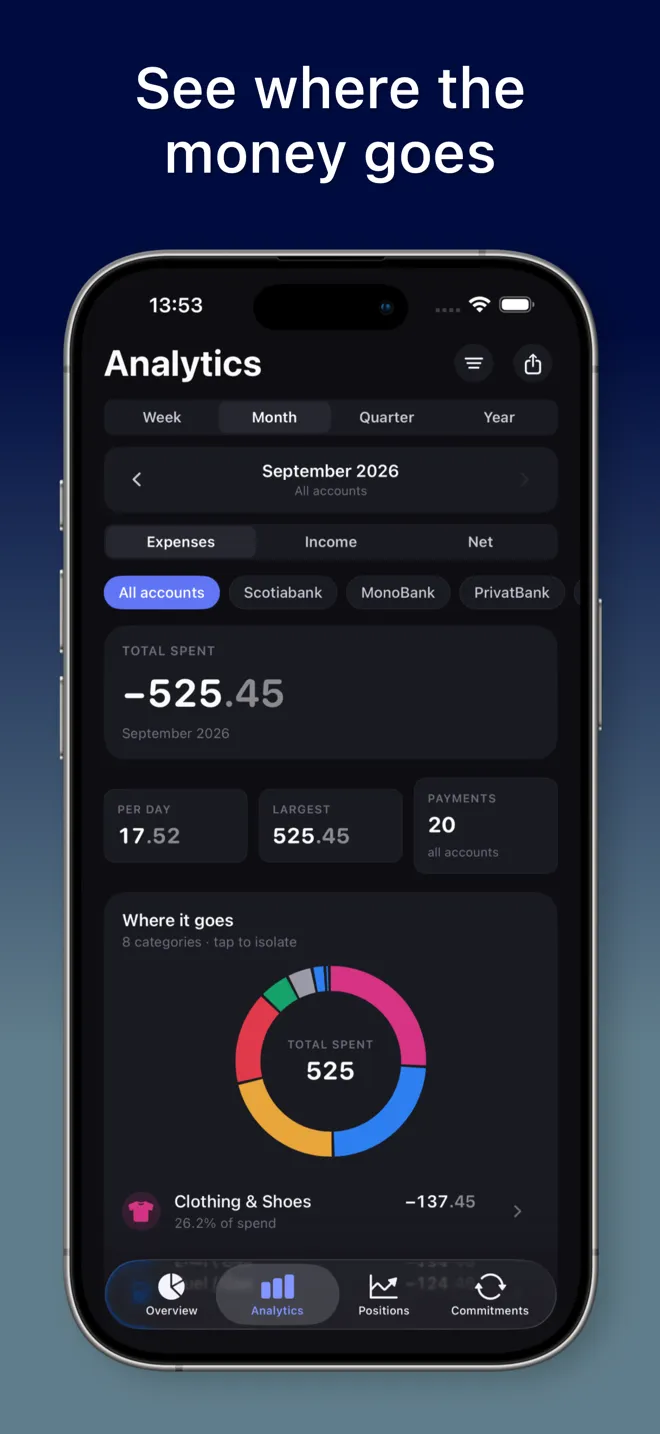
On the free plan Analytics shows one period at a time. Open each month in turn and write the category totals in a note: takeaway, shopping, entertainment, whatever you set out to cut. Side-by-side period comparison is a Premium feature.
Try it in MoneyFlux: before you start, open Analytics for last month and write down your top three discretionary categories. At the end of the challenge, open the same screen for the challenge month and compare the numbers.
Don’t compare against a month with a holiday in it. Take the average of your last two or three ordinary months for each discretionary category and compare against that.
Then look at three things:
One month tells you very little. If a category fell a lot and you did not hate it, keep that cut. Hold off on conclusions about the rest until you have done it twice.
A tracker can’t stop you paying for something. MoneyFlux does not set budgets, block purchases, run a streak counter or send spending alerts, so the rules stay yours.
A challenge also will not fix a spending problem that has deeper causes. If you spend to cope with stress or low mood, feel unable to stop, or are falling behind on bills, speak to a doctor or a financial counselor rather than relying on a month of restraint.
The usual mistake is a binge on day 31. Decide in advance what comes back. Write it down: which categories you will buy again without guilt, and which you will leave out.
Money you did not spend needs somewhere to go. The savings goal calculator guide shows how to turn a leftover amount into a target and a date, and savings goals in MoneyFlux are free. If the whole month leaks rather than one category, the guide to how to stop overspending helps you find where.
This is general information, not financial advice.
A set period, often a week or a month, in which you spend only on essentials: housing, bills, groceries, transport you need, and medicine. Everything discretionary, such as takeaway, clothes, gadgets and apps, waits until the period ends.
Whatever you would be in real trouble without: rent or mortgage, utilities, debt payments, insurance, basic groceries, fuel or a transit pass for getting to work, and medicine. Write your own list before you start, because the gray areas are where challenges collapse.
Pick a length you can finish. Seven days is a fair first try. A month is common, and it is harder because a birthday, a broken appliance or a trip will almost always land inside it.
Log the purchase, tag it, and carry on. One slip does not cancel the challenge. Decide in advance whether you restart the count or just note the exception; either works as long as you pick one before day one.
Not fully. MoneyFlux records every purchase, lets you tag the exceptions and shows your monthly totals by category. It does not block spending, count streaks or send alerts, so the discipline is still yours.