

Spending
Savings Goal Calculator: Work Out Amount, Deadline and Pace
Online calculators hand you one number and no way to check it. The sums behind them are two lines of arithmetic. Here they are, with a worked example you can copy.
Spending
Most advice on how to stop overspending says to spend less everywhere. That fails because the overspending is rarely everywhere. It is usually one or two places, and you can find them.
To work out how to stop overspending, start by noticing that the money rarely leaks everywhere. Rent was the same as last month. The electricity bill was the electricity bill. The extra money went out through two or three channels, and you can find them.
“Spend less” is not a task. “Order delivery twice a week, not five times” is. Where the expense tracker MoneyFlux helps, I say so, and I say where it stops.
You already know you should spend less, so that is not what’s missing.
Cash hurts when it leaves your hand. A card tap doesn’t, and a saved payment method with one-click checkout skips the moment where you’d notice. A subscription skips the decision too.
The total also arrives late. One purchase is small and reasonable. Forty of them are a month, and the bill for the forty shows up when none of them can be changed.
And some spending is a reaction to a bad day or a sale email, not a plan. So the fix has two parts: see the total sooner, and put a gap between the urge and the payment.
By overspending I mean spending more than you meant to, or more than your income leaves room for after you’ve set aside what you want to save. If your income is irregular, use your lowest recent month as the yardstick.
Don’t start with a resolution. Take one full month of spending and look at it.
Here is the idea with made-up numbers. Flexible spending comes to 1,100. Food and delivery is 420 of it. Opening that category shows 160 at one lunch spot, 190 across 14 delivery orders, and 70 at the supermarket. The supermarket line is fine. The delivery line is the leak, and the fix is concrete: about seven orders instead of fourteen would free roughly 95. You want that level of detail.
The guide to finding where your money goes every month covers this in more depth, including how to handle transfers and loans so they don’t inflate the totals.
In MoneyFlux the Analytics screen shows one period at a time with a category donut and top merchants, free. Comparing periods side by side and the daily heatmap, which shows which days of the month cost the most, are in Premium.
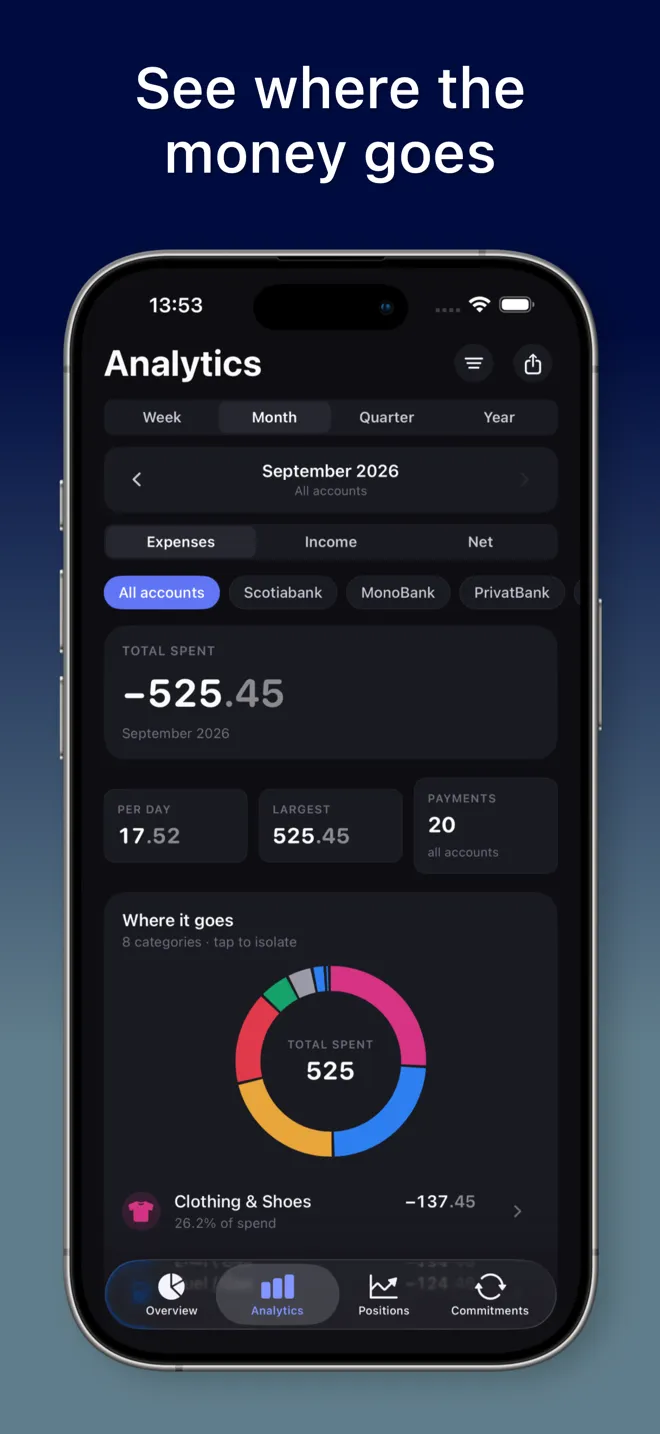
You are done with this step when you can finish one sentence: “Last month I overspent mostly on ___, and mainly at ___.” If you can’t, look at more detail.
Impulse spending is a purchase you decided on in the moment: the jacket, the gadget, the third coffee, the late-night order. You chose to buy it, so you can be given a reason to choose again.
Quiet spending has no decision at the time of payment. Subscriptions, annual renewals, a free trial that turned paid, a delivery fee you stopped noticing. There is nothing to resist at the moment of payment, so a list works better than discipline: keep or cancel, once.
Check yours against the merchants. Many different shops and apps point to impulse. The same names repeating at the same amounts point to quiet spending. You may well have both.
None of these needs willpower. Each one adds a step between you and the checkout.
An app can’t stop you tapping a card. It can make the tap show up. MoneyFlux has a Shortcuts automation for iPhone that logs in-store contactless Apple Pay purchases after the tap, with the amount, merchant and card, tagged #applepay. It covers in-store contactless payments only, not online orders, and you set it up once in Settings. The steps are in the guide to logging Apple Pay purchases automatically with Shortcuts.
For everything else, import your statement weekly instead of monthly, so you see the total while there is still time to change the month.
Write down every subscription, membership and annual renewal, with the amount and how often it renews. Next to each, write when you last used it. Anything you can’t remember using goes on a cancel list. Anything you use rarely gets a decision date.
It helps to hear about a charge before it lands. MoneyFlux’s Commitments tab (Premium) keeps subscriptions and recurring payments in one list with monthly and annual totals, and shows a banner three days before a charge. To do it by hand first, the guide to tracking subscriptions and recurring payments shows how.
If you cut 95 a month from delivery and assign it nothing, it will often drift into something else. Decide what it is for. Give it a target: an amount and a date. “Save more” won’t hold it.
Work out the monthly amount with the arithmetic in the savings goal calculator guide, then record it. MoneyFlux savings goals are free: you set the goal in any currency with an optional deadline, and moving money in or out changes the card’s balance, so the saved amount sits next to your spending. You can also set a monthly savings target as a percentage of income and see your actual rate against it. The app records what you set aside. It does not move money at your bank, and it is not a budget.
Try it in MoneyFlux: import last month’s statement, open Analytics, choose Month, tap the biggest flexible category in the donut and read the merchants. Write down the one you didn’t expect.
Next month, repeat Step 1 and compare only the category you targeted. Your overall total moves for dozens of reasons. If delivery fell, pick the next leak. If it didn’t, change the fix: a longer wait, a different payment method, or a cancellation you have been putting off.
One month is thin evidence, since a trip or a car repair can swamp everything, so look at two or three before deciding. And if the spending comes from something heavier than habit, such as debt, compulsive buying or serious stress, a tracker is the wrong tool. A financial counselor or doctor is a better start. This guide is general information, not financial advice.
Often because paying has become painless. Cards, phones and saved payment details remove the moment where you notice the cost, so the decision happens on feeling, and the total is only visible later. Making the total visible sooner, and adding a short wait before unplanned purchases, works better than promising yourself to be stricter.
Find out where you overspend. Pull one full month of transactions, group them by category and merchant, and look for the category that grew or the merchant you did not expect to see so often. Fix that one before anything else.
It is a common and sensible rule: for anything you did not plan to buy, wait a day and see whether you still want it. It works best for non-essential online and in-store purchases and costs nothing. It does nothing about subscriptions and other charges that happen without a decision.
It cannot stop a purchase. What it does is show the total soon after the spending happens, instead of at month-end. MoneyFlux tracks and categorizes your spending and shows the totals, but it does not set budgets or send spending alerts.
Cash helps some people because the money visibly runs out. It works best for one specific category, such as eating out or takeaway, not for everything. If you use it, record the cash spending somewhere, since it never appears on a bank statement.