Most people get categories wrong by having too many or too few. The names matter less. Forty is a chore you will drop by the third week. Three gives you a total called “Spending” and nothing to act on.
If you are asking how to categorize expenses in a way you will keep up, the list comes first and the app comes last.
What a category is for
For each category, ask whether a high total would change what you do. Rent wouldn’t this month, so it sits in the fixed pile below. If nothing would ever change, merge the category into another one.
Groceries works. You can plan meals or switch shops. “Fun” mostly doesn’t, because a cinema ticket, a game and a haircut have nothing in common. “Other” never works, since a pile with no shape can’t be fixed.
Put two purchases together when the same change would fix both. Takeaway coffee and a restaurant dinner are both eating out, and cooking more cuts both.
How many categories to use
I’d use eight to twelve. Nothing scientific about it. With five, one category swallows so much of the month that its total tells you nothing. With twenty, you dither between “Dining” and “Coffee shops”, and every moment of dithering is a row filed wrong.
Starting from nothing, take the short end. Split a category only when its total stops being readable, say when Shopping has become the biggest bar and you can’t tell why.
A starting list of personal expense categories
Use this as a draft and delete what doesn’t apply to you:
- Housing (rent or mortgage, plus building fees)
- Utilities and phone
- Groceries
- Eating out and takeaway
- Transport (fuel, public transport, taxis, parking)
- Health (pharmacy, doctor, dentist)
- Subscriptions and memberships
- Shopping (clothes, gadgets, household goods)
- Travel
- Debt payments and savings transfers
That is ten. Add a line for anything that is a real, regular part of your life: childcare, a pet, school fees, money you send to family. Taking one away is also fine. Someone without a car has no use for a fuel category.
Keep one more: Other, small on purpose. Its job is to hold the genuinely odd things, a one-off repair or a fee you’ve never seen before, so you can sort them later.
Split fixed from variable costs
Before you sort by category, divide the month into two piles.
Fixed expenses are about the same every month and are agreed in advance: rent, a loan payment, insurance, a phone plan, a gym contract. Variable expenses change with what you do: groceries, fuel, eating out, shopping.
The split decides where to look. If the month ran over, the fixed pile can’t be the reason, since it did not change, and you can’t shrink it by Friday anyway. The variable pile can. Changing a fixed cost is a real decision (a cheaper plan, a different flat), so it belongs on a separate list from this month’s leak.
A few costs sit awkwardly between the two. Electricity is predictable in size but moves with the season. Subscriptions are fixed in price but easy to forget, so they are worth keeping as their own line. Decide once where each goes and write it down.
Write rules for the borderline cases
Every category system breaks on the same few purchases. Decide them once, in writing, and the monthly cleanup gets much shorter. Some examples of the kind of rule you want (these are made-up choices, not the right answers):
- A supermarket receipt that includes cleaning products and a birthday card: it all goes to Groceries, because splitting a receipt costs more attention than it returns.
- Pharmacy: Health if it’s a medicine, Shopping if it’s shampoo.
- Gifts: one Gifts category if you buy several a year, otherwise Shopping.
- Work lunch: Eating out, even if your employer pays you back later. Record the refund as income.
- Amazon or other large marketplaces: file by what was bought, not by the shop name, since the merchant name tells you nothing.
The last one is the common trap. Marketplaces and general stores sell everything, so a category assigned from the merchant name alone will be wrong some of the time. Check the biggest ones by hand.
Clean up once a month, not every day
Sorting each purchase the moment it happens is the route to quitting. Sort in a batch instead:
- Open the month’s transactions and sort by amount, largest first.
- Fix the top 20 rows. These carry most of the money, so a wrong category there matters; a wrong category on a $3 purchase doesn’t.
- Open Other and look for merchants that repeat. Give each repeating one a real category.
- Check any category that grew sharply against the previous month. A jump can be real, or one big purchase filed in the wrong place.
Time yourself the first month. If the pass takes more than an hour, your categories are too fine.
How MoneyFlux handles categories
MoneyFlux has 25 expense categories and 7 income categories, plus custom ones you create yourself. That is more than the ten above. Treat the list as a menu, not a target, and use the ones you need. A custom category, such as “Currency exchange” for conversions, is a good fix when none of the built-in ones fits.
On a bank statement import, categories come from the merchant category code (MCC) that the card network attaches to each payment, where your bank’s file includes it. A supermarket lands in a groceries category without you typing anything. The import guide, how to import a bank statement instead of typing every expense, covers that step by step.
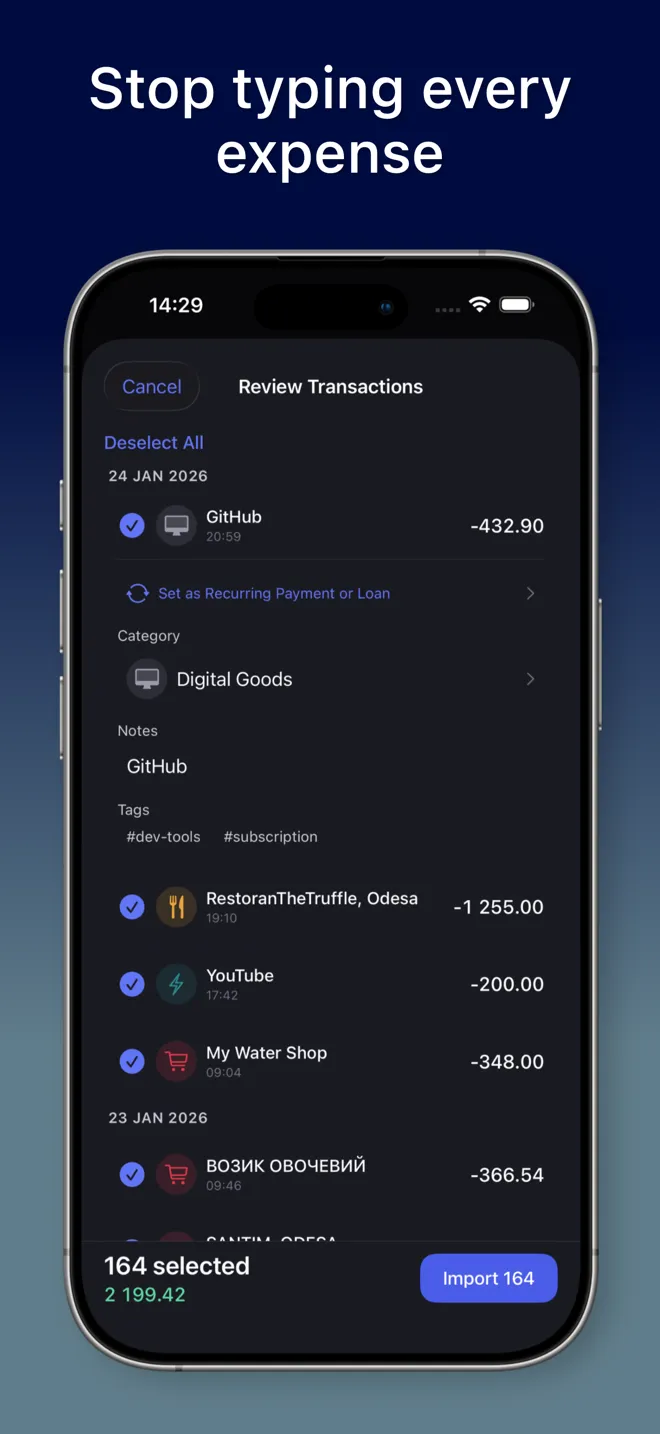
Every imported row also shows up on a review screen before anything is saved. There you can change its category, add a note or tag, or skip it. That is the moment to apply your borderline rules.
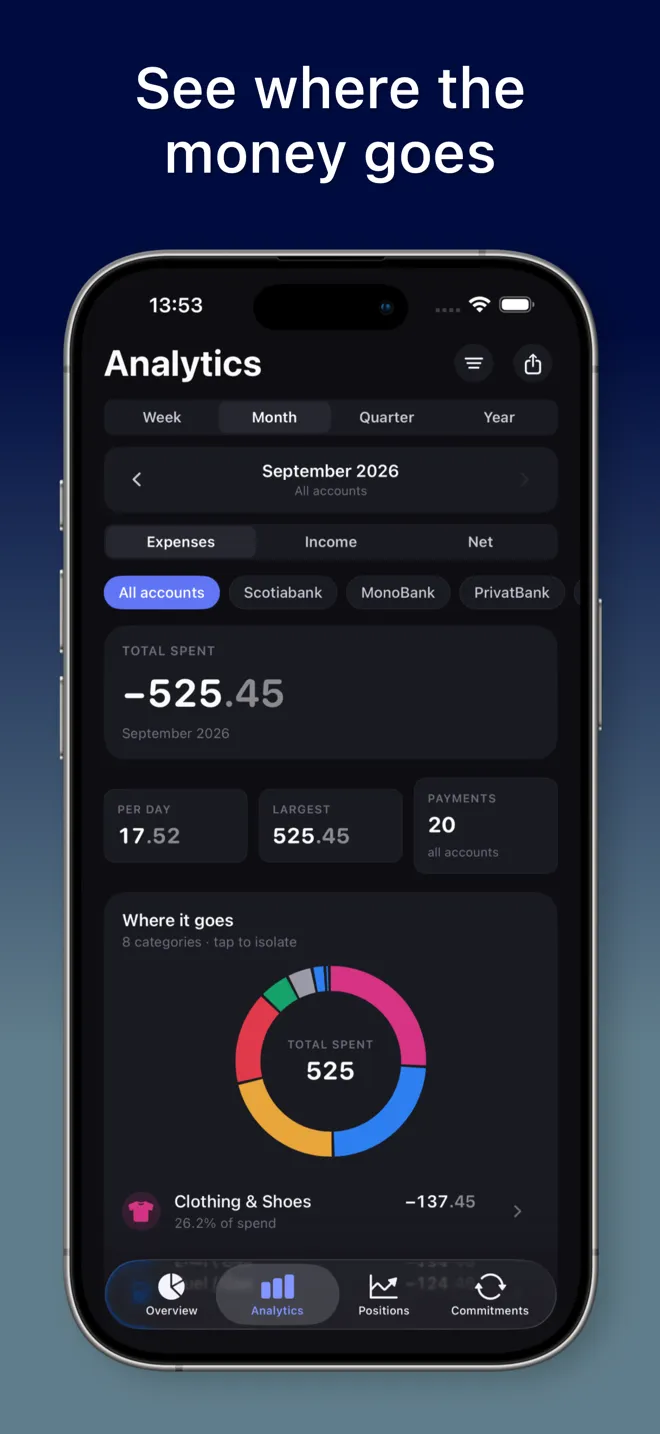
Once the month is in, Analytics shows expenses by category as a donut with your top merchants alongside, which is the view for step 4 above. One period at a time is free; comparing periods and filtering are Premium. For how to read that screen, see where does my money go every month.
Try it in MoneyFlux: import last month’s statement, then use the review screen to fix only the ten largest rows. Open Analytics and check that your top three categories now match how you think about the month.
What this won’t do
The app does not describe any way to teach it your corrections, so expect to check the review screen on every import. It is also not a budget tool: there is a savings target, but no per-category limit and no alert when a category runs over. And MCC-based categories are only as good as the code your bank sends; some files have none, so those rows arrive for you to sort.
Imports are manual, too. You export a file from your bank and pick it in the app, as described on the bank statement import page. If a category total looks too large, check the biggest rows in it first; a few misfiled ones can account for it.
When one category keeps running high
When one variable category keeps running high, how to stop overspending covers finding the merchants behind it and what to change first.
Frequently asked questions
How many expense categories should I have?
Eight to twelve works for most households. Below that, a category like Shopping swallows too much to be useful. Above that, you spend more time filing than learning, and similar categories drift apart.
What are the main personal expense categories?
A common core is housing, utilities, groceries, eating out, transport, health, subscriptions, shopping, travel and savings or debt payments. Add what you actually spend on, such as childcare, pets or support for family, and drop what you don't.
What is the difference between fixed and variable expenses?
Fixed expenses are about the same every month, like rent or a loan payment. Variable expenses change with what you do, like groceries or fuel. The split matters because you can change variable spending this month, while fixed costs need a bigger decision.
What should I do with the Other or Miscellaneous category?
Keep it, but watch its size. If Other is one of your three biggest categories, open it, find the repeating merchants and give them a proper category.
Does MoneyFlux categorize my expenses automatically?
Partly. When you import a bank statement, MoneyFlux uses the merchant category code on card payments where the bank provides one, then shows every row on a review screen so you can change the category before saving. It has 25 expense categories plus custom ones. It does not set budgets.